Radical Technologies
RPA – ROBOTIC PROCESS AUTOMATION
★★★★★
(2,095 ratings)  50,000+ Student

Power Platform

Master Power Platform with industry-oriented, 100% practical training from Radical Technologies.

RT
Radical Technologies
50,000+ English 40 hours Weekdays / Weekends Classroom / Online / Corporate
Online / Classroom

Power Platform

IT Training Programme

Duration 40 hours
Batch Type Weekdays / Weekends
Mode of Training Classroom / Online / Corporate
Locations Pune, Bangalore, Kochi
Language English
Certification Globally Recognized
Call Now

100% placement assistance

What you'll learn

Understand core concepts and architecture from the ground up
Get hands-on with the tools used by working professionals
Build real-world projects you can add to your portfolio
Learn industry best practices and coding standards
Practice with real datasets and real-world scenarios
Prepare for certification and technical interviews
Work on collaborative, team-based exercises
Apply performance tuning and optimization techniques
Understand how the technology fits into a larger ecosystem
Complete assignments reviewed by mentors

Programme Overview

13 sections covering the complete curriculum — a single, progressive learning arc.

40 hours
Training Duration
13
Core Modules
66
Total Lessons
4.4
Average Rating
50K+
Students Trained
01

Foundations & Core Concepts

Get hands-on with the fundamentals and architecture — the building blocks for everything that follows.

Fundamentals Architecture Setup
02

Hands-On Practical Training

Work through real exercises and assignments designed to mirror what you will do on the job.

Practicals Assignments Labs
03

Real-World Projects

Apply what you have learned to end-to-end projects that go straight into your portfolio.

Projects Portfolio Case Studies
04

Advanced Techniques

Go beyond the basics with advanced concepts, integrations and production-grade practices.

Advanced Integration Best Practices
05

Ecosystem Integration

Understand how this technology connects with the broader tools and platforms used in the industry.

Ecosystem Tools Platforms
06

Performance & Interview Prep

Master optimization techniques and prepare for the technical interview questions employers actually ask.

Optimization Interview Prep Certification

Who is this programme for?

Whether you're already writing code, working with data, or supporting applications today — this programme is built to take you into a RPA – ROBOTIC PROCESS AUTOMATION role.

Software Developers

Engineers who want to add this skill set to their toolkit

Analysts & Consultants

Professionals moving into a more technical, hands-on role

IT Professionals

System admins and support engineers upskilling into a new domain

Fresh Graduates

CS/IT graduates aiming for a job-ready technical role

Course Curriculum

13 sections  •  66 lessons  •  40 hours

01 Microsoft PowerApps
This course delivers an instructor-led breakdown of Microsoft PowerApps. Students will be taught how to design, test and publish new applications that work with a variety of data sources. We will take users through a selection of well-crafted lessons to help them build new applications for their business.
02 Module 1: An introduction to Microsoft PowerApps
Let’s get started with an introduction to Microsoft PowerApps. Traditionally building customized solutions for a business involved using a coding language to build an application from scratch. Typically, these solutions could often only be used within the business, making external use of the application a large hurdle to overcome. With PowerApps we can now not only easily build solutions, but we can also share them with users in our business. Deployment takes seconds and you could by testing your own app on your phone in no time. This module will overview the features of PowerApps, its benefits to a business and the variety of ways you can build and access your apps on different devices.

Topics Covered

What is PowerApps?
The benefits of apps
How to get to PowerApps
Canvas Apps and Model-Driven Apps
License Options and Costs
03 Module 2: Getting started with PowerApps
To begin our journey through the PowerApps product, we will begin by looking at some of the templates that are available to view and edit. Microsoft’s templates are a good starting point to discover what the product is capable off and how it can be achieved. We will also take the chance to have a tour of the editor so that students are familiar with the interface that they will be using over the two-day course. We will then build our first app from a static data source, showing students how to test their changes in the app instantly without the need to publish. We will also discuss how to configure your apps settings and how to access the app once it has been saved and shared.

Topics Covered

Discover PowerApps with templates
Building a new app with a data source
Add, edit and remove controls
Testing an app
App settings
Publish and share an app
Mobile app
04 Module 3: Branding and Media
In our next module, we will look at the options available to designers that allow them to implement their business branding. Not only will this deal with the aesthetics of your app, it will also introduce time-saving tips to help keep your branding consistent. We will also be discussing how to embed media into your app which can be useful if you are planning on an app that might promote video content.
Topics Covered
Linking control properties
Backgrounds
Colours and transparency
Duplicating screens
Copying the look and feel
Using images
Embed and play audio and video
05 Module 4: PowerApp Controls
So far in the course, we would have covered the basics of adding, editing and removing controls from our applications. The drive behind this module is to provide more depth on the categories of controls which can be used on a form. Your instructor will take you through each control and discuss its purpose and configuration. Tackling the wide selection of controls will help students recognise when to use the right control.

Topics Covered

Labels
Buttons
Text inputs
Controls
Galleries
Data tables
Forms
Media
Charts
Icons
06 Module 5: Data Sources and Logic
To help maintain and view essential business information, organisations often have a diverse selection of locations to keep different types of data. This could range from databases to file storage locations. PowerApps offers connections to a wide selection of data sources. We will show students to build their PowerApps to bring in data from a variety of sources as well as how they can utilise the common data source, a storage location unique to PowerApps.

Topics Covered

Working with files
Databases
Filter, sort and search formulas
If and Select
Accessing on-premises sources
The common data source
Sharing data sources
07 Module 6: Model-Driven Apps
Module one to five discussed how to work with the original type of PowerApp known as a Canvas App, Microsoft have now introduced a second type of app known as a model-driven app. Model driven apps involve a different development process to canvas apps. We will review this development process during this module.
Model-Driven apps can be quicker to build than canvas apps, but they are less customizable and typically have a higher cost, knowing which type of app to use is not always a simple decision, we will show you the pros and cons of each.

Topics Covered

What is a model-driven app?
Where will my data be stored?
How do create a model-driven app
Canvas vs model-driven summary
Mobile App
08 Module 7: PowerApps Integration
PowerApps is designed to easily connect to other business systems to read and update information. In this module we will discuss some simple ways to integrate PowerApps with key Office 365 systems including Teams, SharePoint Online and Flow. The result, is the ability to use a combination of systems to create solutions for a variety of business requirements.

Topics Covered

Start a Flow from a PowerApp
Embed PowerApps in Teams
Embed PowerApps in SharePoint Online
09 Module 8: Administration and Maintenance
In our last module for Microsoft PowerApps, we will be looking at how a business can manage their existing apps. This could be using analytics to discover usage trends. We will discover how to export and import apps, so they can be reused in other locations. Finally, we will discuss how Office 365 administrators can shape the PowerApps experience with high-level settings that help ensure data segregation and security.

Topics Covered

Maintaining an app
View analytics
Export and import apps
Office 365 administration for PowerApps
Environments
Data policies
Data integration
10 Module 9: Power Automate Editing Interface
In this first module, we will go into creating blank Flows and building them from scratch.  This includes an overview of the interface and options when building Flows, and concepts such as triggers, actions, conditions, and dynamic content.  Flow sharing and collaboration concepts will also be covered, as well as the mobile app.There are hundreds of available triggers in Microsoft Flow.  In this module, you will learn how to use them, and we will deep dive into some specific common and important triggers.  Learn about manual triggers and how initiation parameters work. This module also covers how to trigger a flow from a SharePoint list or library, how to create a flow trigger button on an item, and how to trigger a flow from Teams. Other triggers such as recurrences, Microsoft Forms, and Outlook will be demonstrated as well.
11 Module 10: Power Automate Approval Processes
In this module, you will learn about your options when it comes to building approval processes.  There is a Flow action called Approvals, that has a lot of built in functionality.  There are also other ways that you can go about it.  Send emails, assign tasks, assign planner tasks, send email with options.  These various ways will be discussed, compared, and demonstrated.  Learn about approval concepts such as dynamic multiple approvers, serial versus parallel, working with SharePoint content approval, and how to build a flow that sends overdue notifications.
12 Module 11: Power Automate Conditions, Loops & more
This module is about conditions, loops, and some more common actions.  Conditions let you create IF THEN statements and various branches of a workflow.  Learn about the new interface for creating complex conditions, and other related concepts, such as switches and parallel branches.  With more complex workflows, it is also important to understand looping, and different types of loops, such as apply to each, and do until.  In this module, you will also learn about settings that can be configured on each action, and some useful actions such as date time, schedule, and actions that format numbers and dates.
13 Module 12: Power Automate Variables & Expressions
When building Flows, it is important to understand how variables are used, and how to build expressions.  There are several different types of variables, and there are over twelve different actions relating to variables and other data operations.  In this module, we discuss and demonstrate these, as well as how to work with arrays (lists of things) in Flows.  The expression builder is covered, with examples of how it is used, and what the possibilities are.  You will learn how to parse JSON, work with HTML and CSV table actions, and you will see several advanced demonstrations of how to utilize all these more complex concepts.

Tools & Technologies

Every tool listed here is installed, configured and used in a hands-on lab session.

Core Tools

Hands-On Labs

Practical Environment

Industry-Standard Tools

Real-World Setup

Guided Exercises

Skill Building

Sample Datasets

Practice Material

Practice & Projects

Mini Projects

Applied Practice

Assignments

Mentor Reviewed

Doubt Sessions

Live Support

Career Readiness

Resume Building

Career Support

Mock Interviews

Interview Prep

Certification Prep

Global Recognition

Deployment & Delivery

Production Practices

Real-World Ready

Best Practices

Industry Standards

66+
Hands-On Lessons
13
Core Modules
40 hours
Training Duration
100%
Practical Training

You don't just learn Power Platform. You ship it.

Three major projects, each mirroring how production teams actually work — from guided foundations to a portfolio-ready capstone.

PROJECT // 01

Guided Foundation Project

Requirement Analysis

Guided Implementation

Mentor Review

Iteration

Foundation Beginner

Apply the fundamentals in a structured, mentor-reviewed project

Take the core concepts from the first half of the curriculum and apply them to a realistic scenario, with guidance and feedback from your mentor at every step.

Structured project brief
Step-by-step implementation
Mentor feedback and review
Documented outcome
Stack Core Concepts Best Practices
PROJECT // 02

Applied Practice Project

Scenario Design

Independent Build

Testing & Validation

Peer Review

Applied Intermediate

Build a more independent project mirroring real production scenarios

Work through a project that combines multiple concepts from the curriculum, closer to how work is actually structured on the job — less hand-holding, more ownership.

End-to-end implementation
Testing and validation
Documentation
Peer/mentor review
Stack Applied Skills Testing
PROJECT // 03

Capstone Project

Planning

End-to-End Build

Review & Refinement

Presentation

Capstone Advanced

Take a project from requirements to a polished, portfolio-ready deliverable

Your final project — plan, build, test and present a complete solution using everything covered in the curriculum, reviewed by mentors before you graduate.

Complete working solution
Presentation-ready documentation
Mentor sign-off
Portfolio-ready deliverable
Stack Full Curriculum Portfolio

All 3 projects go directly into your portfolio & resume — reviewed by mentors before you graduate.

See Sample Project Reports

Upcoming Batches

No upcoming batches scheduled right now. Enquire to get notified.

Why Radical Technologies

Live Online Training
  • Highly practical oriented training
  • Installation support on your system
  • 24/7 Email and Phone support
  • 100% Placement Assistance
  • Global Certification Preparation
  • Trainer-Student Interactive Portal
  • Assignments and Projects by Mentors
Enroll Now
Live Classroom Training
  • Weekend / Weekdays / Morning / Evening batches
  • 80:20 Practical and Theory ratio
  • Real-life Case Studies
  • Easy make-up for missed sessions
  • PSI | Kryterion | Redhat Test Centers
  • Lifetime Video Classroom Access (coming soon)
  • Resume Prep and Mock Interviews
Enroll Now
Self-Paced Training
  • Learn 300+ courses at your own time
  • 50,000+ Satisfied Learners
  • Course Completion Certificate
  • Practical Labs available
  • Mentor Support available
  • Doubt Clearing Session available
  • 10% Discounted Global Certification
Enroll Now

Like the Curriculum? Let's Get Started

Join 50,000+ students already enrolled at Radical Technologies

Enroll Now

Global Certification

Radical Technologies is the leading IT certification institute in Pune, offering globally recognized certifications across various domains. With expert trainers and comprehensive materials, we ensure students gain in-depth knowledge and hands-on experience to excel in their careers. Our certification programs are tailored to meet industry standards — from cloud technologies to data science — empowering individuals to stay ahead in the ever-evolving tech landscape.
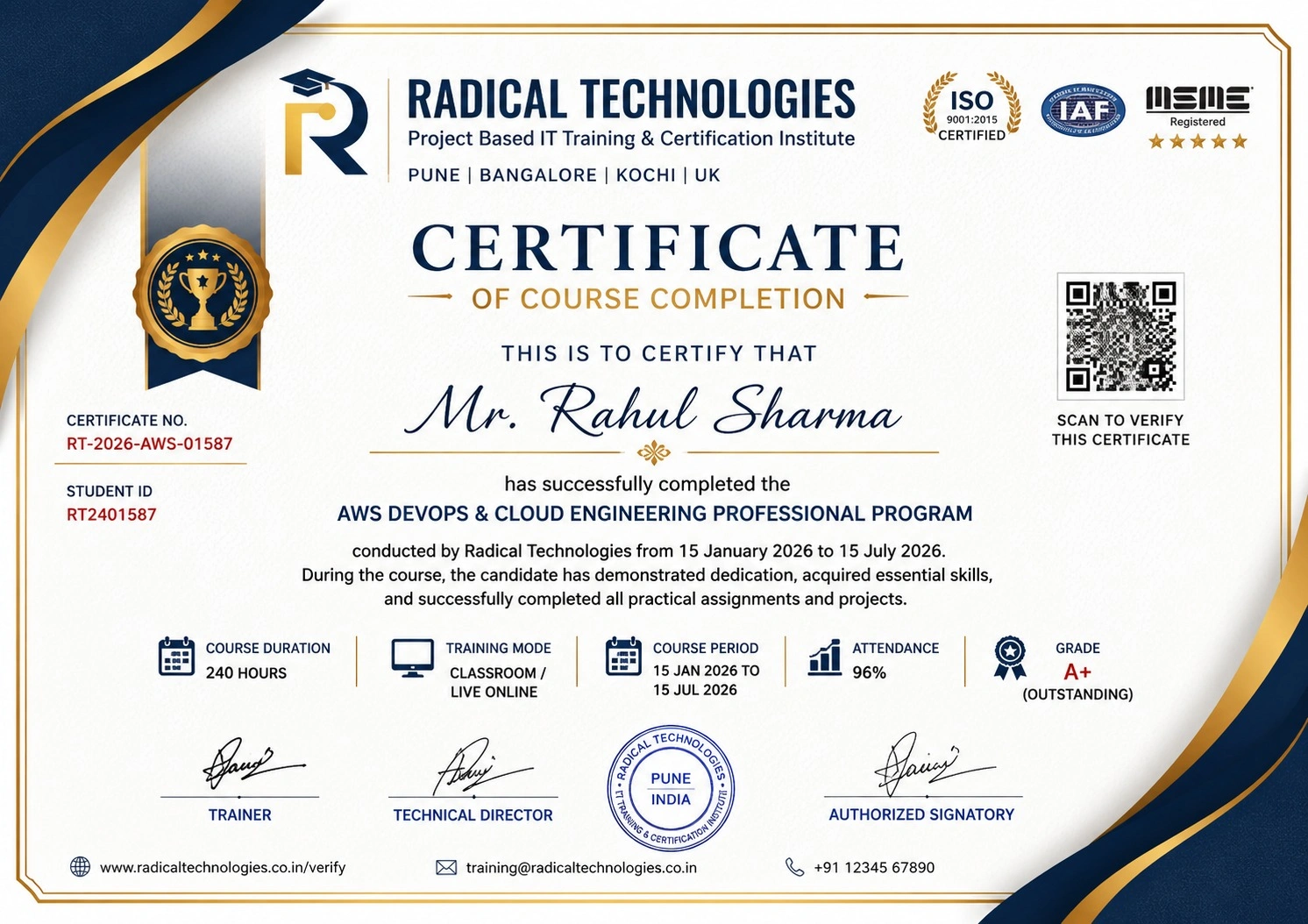
Certificate of Completion

Career Services

At Radical Technologies, we are committed to your success beyond the classroom. Our 100% Job Assistance program ensures that you are not only equipped with industry-relevant skills but also guided through the job placement process. With personalised resume building, interview preparation, and access to our extensive network of hiring partners, we help you take the next step confidently into your IT career.

Career Support

Course Completed? Need next steps?
Need Interview Supports?
Need Job Assistance?
Came from any other Institute?

Join our Brush-up Session & get support until you find a job!

Get Started

Radical Learning Eco-System

Exam Simulator

Cloud SandBox

Hands-on Cloud Lab

Developer Coding Ground

Student Reviews

4.4★
Average learner rating
50K+
Students trained
30+
Hiring companies alumni work at
100%
Placement assistance
4.4
★★★★★

Course Rating

★★★★★
62%
★★★★☆
21%
★★★☆☆
10%
★★☆☆☆
4%
★☆☆☆☆
3%

Our Alumni Work At
Accenture
Amazon
Avisys Services
Birlasoft
Capgemini
Catchpoint
Cognizant
Darwish Cybertech
DataVision
GiBots
Google
Groots Software
HCL Technologies
IBM
Info Gain
Infosys
ITCube Solutions
KPIT
L&T Infotech
Microsoft
Mphasis
mPhatek
Oracle
Quantbit Technologies
Saina Cloud
TCS
Tech Mahindra
Wipro
YASH Technologies
Zensar Technologies
Accenture
Amazon
Avisys Services
Birlasoft
Capgemini
Catchpoint
Cognizant
Darwish Cybertech
DataVision
GiBots
Google
Groots Software
HCL Technologies
IBM
Info Gain
Infosys
ITCube Solutions
KPIT
L&T Infotech
Microsoft
Mphasis
mPhatek
Oracle
Quantbit Technologies
Saina Cloud
TCS
Tech Mahindra
Wipro
YASH Technologies
Zensar Technologies