Radical Technologies
VIRTUALIZATION
★★★★★
(2,095 ratings)  50,000+ Student

VMware 6,7 & 8

VMWARE ESXI 6.5 / 6.7/ 7.0 with all upgradation , Configuration and Troubleshooting skills on Cisco UCS Server VMware VCP

RT
Radical Technologies
50,000+ English 70 hours Weekdays / Weekends Classroom / Online / Corporate
Online / Classroom

VMware 6,7 & 8

IT Training Programme

Duration 70 hours
Batch Type Weekdays / Weekends
Mode of Training Classroom / Online / Corporate
Locations Pune, Bangalore, Kochi
Language English
Certification Globally Recognized
Call Now

100% placement assistance

What you'll learn

Understand core concepts and architecture from the ground up
Get hands-on with the tools used by working professionals
Build real-world projects you can add to your portfolio
Learn industry best practices and coding standards
Practice with real datasets and real-world scenarios
Prepare for certification and technical interviews
Work on collaborative, team-based exercises
Apply performance tuning and optimization techniques
Understand how the technology fits into a larger ecosystem
Complete assignments reviewed by mentors

Programme Overview

10 sections covering the complete curriculum — a single, progressive learning arc.

70 hours
Training Duration
10
Core Modules
168
Total Lessons
4.4
Average Rating
50K+
Students Trained
01

Foundations & Core Concepts

Get hands-on with the fundamentals and architecture — the building blocks for everything that follows.

Fundamentals Architecture Setup
02

Hands-On Practical Training

Work through real exercises and assignments designed to mirror what you will do on the job.

Practicals Assignments Labs
03

Real-World Projects

Apply what you have learned to end-to-end projects that go straight into your portfolio.

Projects Portfolio Case Studies
04

Advanced Techniques

Go beyond the basics with advanced concepts, integrations and production-grade practices.

Advanced Integration Best Practices
05

Ecosystem Integration

Understand how this technology connects with the broader tools and platforms used in the industry.

Ecosystem Tools Platforms
06

Performance & Interview Prep

Master optimization techniques and prepare for the technical interview questions employers actually ask.

Optimization Interview Prep Certification

Who is this programme for?

Whether you're already writing code, working with data, or supporting applications today — this programme is built to take you into a VIRTUALIZATION role.

Software Developers

Engineers who want to add this skill set to their toolkit

Analysts & Consultants

Professionals moving into a more technical, hands-on role

IT Professionals

System admins and support engineers upskilling into a new domain

Fresh Graduates

CS/IT graduates aiming for a job-ready technical role

Course Curriculum

10 sections  •  168 lessons  •  70 hours

01 VCP6-DCV (Data Center Virtualization) Syllabus

1.vSphere 6 Architecture:

Components (ESXi, vCenter, etc.)
Host configurations and requirements
Virtual machine management

2.Installation and Configuration:

Installing and configuring ESXi and vCenter Server
vSphere client installation and usage
Storage and networking configuration

3.Networking:

Virtual switches, distributed switches
Network policies and security
VLANs, NIC teaming

4.Storage:

VMFS, NFS, and iSCSI
Storage DRS and Datastore Clusters
Storage multipathing and failover

5.VM Management:

Deploying, configuring, and managing virtual machines
Cloning and templates
Snapshots and backup strategies

6.Resource Management and Monitoring:

Resource pools
DRS (Distributed Resource Scheduler)
Monitoring performance (CPU, memory, storage)

7.High Availability & Fault Tolerance:

vSphere HA configuration
vSphere Fault Tolerance
Host and VM monitoring

8.Security:

Managing user access and roles
Virtual machine encryption
Firewall and network security settings

9.Automation and Management:

vCenter alarms and events
vSphere Update Manager (VUM)
Scripting with PowerCLI
02 VCP7-DCV Syllabus

1.vSphere 6.5 Enhancements:

vCenter Server Appliance (VCSA)
vSphere Client (HTML5) and Web Client
REST-based APIs

2.Networking:

Enhancements in vSphere 6.5 networking (NSX)
Network IO Control (NIOC)
vSphere Distributed Switch (VDS)

3.Storage:

vSAN 6.5 integration
VVOLs (Virtual Volumes) and storage policies
Enhanced storage capabilities with SPBM (Storage Policy-Based Management)

4.VM Management:

Enhancements in VM lifecycle management
New features for cloning, snapshots, and backup

5.Security Enhancements:

Secure boot for ESXi and VMs
VM Encryption, TPM 2.0 support
vCenter Single Sign-On (SSO)

6.Availability and Scalability:

vSphere HA improvements (Proactive HA)
vSphere Fault Tolerance 6.5 (multiprocessor FT)
Enhanced vMotion (cross vCenter, long-distance vMotion)

7.Monitoring and Performance:

vSphere with Operations Management (vSOM)
vRealize Operations integration
DRS and DPM improvements

8.Automation:

vSphere APIs for IO Filtering (VAIO)
PowerCLI updates and use cases
Automating tasks with vRealize Orchestrator (vRO)
03 VCP8-DCV Syllabus

1.vSphere 8 Architecture:

Enhancements in vSphere 8 architecture (ESXi, vCenter)
New deployment and management tools
vSphere 8 Client (HTML5)

2.Networking:

Enhancements in Distributed Switches (vDS) for vSphere 8
NSX-T integration and use cases
Network IO Control (NIOC) improvements

3.Storage:

Enhanced vSAN integration and management
Storage policies and vVOLs
NVMe over Fabrics (NVMe-oF)

4.Resource and VM Management:

New features for VM provisioning and management
Auto-scaling with DRS
Enhanced VM lifecycle management

5.Security:

vSphere Trust Authority (vTA) for secure operations
VM encryption and key management updates
Advanced access control and user role management

6.High Availability & Fault Tolerance:

Advanced HA with proactive DRS and HA integration
Fault tolerance improvements in multi-core VMs
Resilient networking for HA

7.Monitoring and Performance:

Enhanced tools for performance analysis
vRealize Operations Cloud integration
Performance enhancements for large workloads

8.Automation and Scalability:

Integration with Kubernetes and vSphere with Tanzu
PowerCLI 12.0+ features
Automation of cloud-native workloads using APIs

9.Cloud and Hybrid Integration:

vSphere with Tanzu integration for Kubernetes workloads
VMware Cloud on AWS and other cloud solutions
Multi-cloud and hybrid-cloud management
04 Job Oriented Scenarios
Here is a job-oriented Topics for VMware versions 6, 7, and 8, focused on scenarios covering installation, configuration, troubleshooting, and migration. This Topics  are tailored to help you prepare for real-world tasks and challenges you might face in enterprise environments.
05 Installation Scenarios (Version 6, 7, 8)

1.1 ESXi Installation:

Understanding ESXi versions (6.x, 7.x, 8.x) and hardware requirements.
Preparing hardware for ESXi installation (BIOS settings, CPU, RAM, storage).
Installation of VMware ESXi:
Using ISO to install ESXi.
Configuring ESXi networking (static IP, DNS).
Hostname and time synchronization settings.
Managing host resources (CPU, RAM).

1.2 vCenter Server Appliance (VCSA) Installation:

Understanding differences between vCenter on Windows vs VCSA.
Deployment of VCSA (6.x, 7.x, 8.x) using the vSphere Client or command-line installer.
Configuring embedded vs external Platform Services Controller (PSC).
DNS, NTP, and Active Directory integration.
vCenter SSO domain configuration.
06 Configuration Scenarios (Version 6, 7, 8)

2.1 vSphere Networking:

Configuring Standard and Distributed vSwitches (vSwitch, vDS).
Port groups, VLANs, and NIC teaming.
vMotion, FT, and management network configurations.
Configuring vSphere 7.x/8.x networking enhancements:
Network IO Control (NIOC).
NSX-T integration and configuration.
Troubleshooting network connectivity between VMs and hosts.

2.2 Storage Configuration:

Setting up and managing datastores (VMFS, NFS, iSCSI, and vSAN).
Adding and managing storage devices (LUNs, NFS shares).
Configuring Storage Policy-Based Management (SPBM) for VVOLs.
Multipathing for storage redundancy and performance optimization.
Enabling and configuring vSAN on vSphere 7.x and 8.x.
Troubleshooting storage performance issues.

2.3 Virtual Machine (VM) Configuration:

Creating and configuring VMs with specific CPU, memory, and disk resources.
Best practices for cloning and templates.
Resource allocation via resource pools.
VM Hardware upgrades and managing VM compatibility versions (hardware version).
Optimizing VM performance (NUMA, hot-add memory/CPU).

2.4 High Availability (HA) and Fault Tolerance (FT):

Configuring and testing vSphere HA:
Host monitoring and VM restart priorities.
HA for critical VMs and disaster recovery considerations.
Implementing Fault Tolerance (FT) for mission-critical applications (vSphere 7.x/8.x).
Multiprocessor FT on vSphere 7.0+.
Troubleshooting HA and FT failures.

2.5 vCenter Configuration:

vCenter single sign-on (SSO) and role-based access control.
Creating and managing vCenter alarms and customized alerts.
Backup and restore of vCenter configuration using native tools.
Integration of vCenter with external identity sources (e.g., LDAP, Active Directory).
Monitoring vCenter Server performance and database growth.
07 Troubleshooting Scenarios (Version 6, 7, 8)

3.1 Networking Issues:

Troubleshooting vMotion failures between hosts (network connectivity, CPU compatibility).
Fixing distributed switch issues and incorrect VLAN configurations.
Resolving network throughput issues and optimizing NIC teaming/load balancing.
Using esxtop and network performance counters to diagnose slow network performance.

3.2 Storage Issues:

Diagnosing and fixing datastore connectivity issues (NFS/iSCSI).
Troubleshooting storage performance problems (latency, I/O contention).
Using vSAN health check tools and resolving vSAN configuration issues.
Resolving storage multipathing problems and failover failures.

3.3 Virtual Machine Issues:

Solving VM performance degradation issues (CPU, memory, disk).
Diagnosing high CPU Ready time or high I/O wait times.
Troubleshooting VM freezing or unresponsiveness.
Resolving snapshots issues (consolidation errors, performance impact).
Fixing power-on failures and VM network connectivity problems.

3.4 ESXi Host Issues:

Troubleshooting host crashes and using VMkernel logs for root cause analysis.
Solving PSOD (Purple Screen of Death) and host hardware failure.
Troubleshooting host network issues (management network, VMkernel adapters).
Identifying and fixing host overcommitment (CPU, memory).

3.5 vCenter Issues:

Troubleshooting vCenter Server Appliance (VCSA) performance issues.
Fixing vCenter database growth and disk space issues.
Solving vCenter upgrade or patch failures.
Handling vCenter backup/restore failures.
08 Migration Scenarios (Version 6, 7, 8)

4.1 Migrating from vSphere 6.x to 7.x/8.x:

Planning for vSphere 6.x to 7.x or 8.x upgrades (vCenter and ESXi).
Compatibility checks (hardware, drivers, VMs).
Upgrade paths and best practices for minimal downtime.
Upgrading VM hardware version and VMware Tools post-migration.
Migrating existing VMs using vMotion or cold migration between clusters.
Migrating hosts to vSphere 8.x with EVC mode to ensure CPU compatibility across different generations.

4.2 vCenter Server Migrations:

Migrating from Windows-based vCenter to VCSA (vCenter Server Appliance):
Using the vCenter migration tool (Windows to VCSA).
Migrating inventory, performance data, and configuration.
vCenter upgrade scenarios:
Upgrading from vCenter 6.x to 7.x or 8.x.
Best practices for backup and rollback in case of failure.
Troubleshooting vCenter migration issues (connectivity, database errors).

4.3 vSphere Storage Migration:

Migrating datastores from NFS/iSCSI to vSAN or other storage solutions.
Using Storage vMotion to move VMs between different datastores without downtime.
Migrating workloads from local storage to shared storage (datastore migration).
Troubleshooting Storage vMotion failures and slow migrations.

4.4 Hybrid Cloud Migration:

Migrating VMs to VMware Cloud on AWS or other cloud-based vSphere environments.
Planning for hybrid cloud integration with vSphere 7.x/8.x.
Configuring VMware HCX for workload migration to cloud.
Best practices for disaster recovery using VMware Site Recovery Manager (SRM).
09 Automation and Monitoring (Version 6, 7, 8)

5.1 vSphere Automation and PowerCLI:

Automating common tasks (e.g., VM provisioning, resource management) using PowerCLI.
Automating vSphere 7.x/8.x environments using vRealize Orchestrator (vRO).
Scripting bulk VM operations, host configurations, or patch management.

5.2 vSphere Monitoring Tools:

Using vSphere with Operations Management (vSOM) to monitor performance.
Integrating vRealize Operations (vROps) for advanced metrics and alerting.
Monitoring VM and host performance using esxtop and vCenter metrics.
Configuring custom alarms and alerts in vCenter for proactive monitoring.
10 Key Job-Oriented Focus Areas

Installation & Upgrade: Ensure you are comfortable installing ESXi hosts, deploying vCenter, and managing upgrades/migrations across versions.

Configuration: Focus on configuring networking, storage, HA/FT, and role-based access control (RBAC) to suit enterprise needs.

Troubleshooting: Develop skills in diagnosing and fixing issues related to VM performance, storage connectivity, host failures, and network problems.

Migration: Be familiar with migration strategies, including vMotion, storage migration, and vCenter migrations from older versions to the latest.

Automation: Learn to automate routine tasks using tools like PowerCLI and integrate monitoring tools to ensure system health and performance.

Tools & Technologies

Every tool listed here is installed, configured and used in a hands-on lab session.

Core Tools

Hands-On Labs

Practical Environment

Industry-Standard Tools

Real-World Setup

Guided Exercises

Skill Building

Sample Datasets

Practice Material

Practice & Projects

Mini Projects

Applied Practice

Assignments

Mentor Reviewed

Doubt Sessions

Live Support

Career Readiness

Resume Building

Career Support

Mock Interviews

Interview Prep

Certification Prep

Global Recognition

Deployment & Delivery

Production Practices

Real-World Ready

Best Practices

Industry Standards

168+
Hands-On Lessons
10
Core Modules
70 hours
Training Duration
100%
Practical Training

You don't just learn VMware 6,7 & 8. You ship it.

Three major projects, each mirroring how production teams actually work — from guided foundations to a portfolio-ready capstone.

PROJECT // 01

Guided Foundation Project

Requirement Analysis

Guided Implementation

Mentor Review

Iteration

Foundation Beginner

Apply the fundamentals in a structured, mentor-reviewed project

Take the core concepts from the first half of the curriculum and apply them to a realistic scenario, with guidance and feedback from your mentor at every step.

Structured project brief
Step-by-step implementation
Mentor feedback and review
Documented outcome
Stack Core Concepts Best Practices
PROJECT // 02

Applied Practice Project

Scenario Design

Independent Build

Testing & Validation

Peer Review

Applied Intermediate

Build a more independent project mirroring real production scenarios

Work through a project that combines multiple concepts from the curriculum, closer to how work is actually structured on the job — less hand-holding, more ownership.

End-to-end implementation
Testing and validation
Documentation
Peer/mentor review
Stack Applied Skills Testing
PROJECT // 03

Capstone Project

Planning

End-to-End Build

Review & Refinement

Presentation

Capstone Advanced

Take a project from requirements to a polished, portfolio-ready deliverable

Your final project — plan, build, test and present a complete solution using everything covered in the curriculum, reviewed by mentors before you graduate.

Complete working solution
Presentation-ready documentation
Mentor sign-off
Portfolio-ready deliverable
Stack Full Curriculum Portfolio

All 3 projects go directly into your portfolio & resume — reviewed by mentors before you graduate.

See Sample Project Reports

Upcoming Batches

No upcoming batches scheduled right now. Enquire to get notified.

Why Radical Technologies

Live Online Training
  • Highly practical oriented training
  • Installation support on your system
  • 24/7 Email and Phone support
  • 100% Placement Assistance
  • Global Certification Preparation
  • Trainer-Student Interactive Portal
  • Assignments and Projects by Mentors
Enroll Now
Live Classroom Training
  • Weekend / Weekdays / Morning / Evening batches
  • 80:20 Practical and Theory ratio
  • Real-life Case Studies
  • Easy make-up for missed sessions
  • PSI | Kryterion | Redhat Test Centers
  • Lifetime Video Classroom Access (coming soon)
  • Resume Prep and Mock Interviews
Enroll Now
Self-Paced Training
  • Learn 300+ courses at your own time
  • 50,000+ Satisfied Learners
  • Course Completion Certificate
  • Practical Labs available
  • Mentor Support available
  • Doubt Clearing Session available
  • 10% Discounted Global Certification
Enroll Now

Like the Curriculum? Let's Get Started

Join 50,000+ students already enrolled at Radical Technologies

Enroll Now

Global Certification

Radical Technologies is the leading IT certification institute in Pune, offering globally recognized certifications across various domains. With expert trainers and comprehensive materials, we ensure students gain in-depth knowledge and hands-on experience to excel in their careers. Our certification programs are tailored to meet industry standards — from cloud technologies to data science — empowering individuals to stay ahead in the ever-evolving tech landscape.
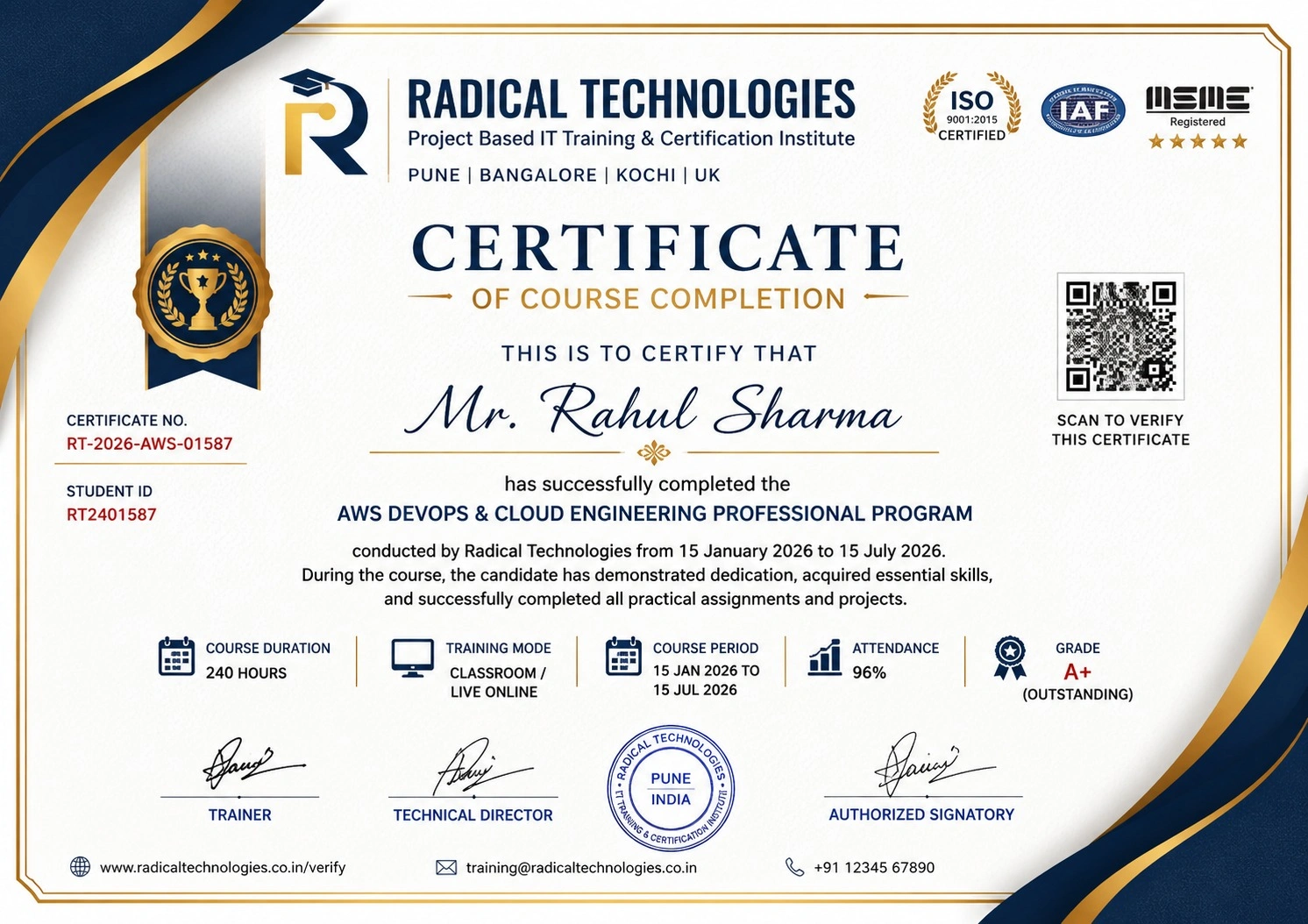
Certificate of Completion

Career Services

At Radical Technologies, we are committed to your success beyond the classroom. Our 100% Job Assistance program ensures that you are not only equipped with industry-relevant skills but also guided through the job placement process. With personalised resume building, interview preparation, and access to our extensive network of hiring partners, we help you take the next step confidently into your IT career.

Career Support

Course Completed? Need next steps?
Need Interview Supports?
Need Job Assistance?
Came from any other Institute?

Join our Brush-up Session & get support until you find a job!

Get Started

Radical Learning Eco-System

Exam Simulator

Cloud SandBox

Hands-on Cloud Lab

Developer Coding Ground

Student Reviews

4.4★
Average learner rating
50K+
Students trained
30+
Hiring companies alumni work at
100%
Placement assistance
4.4
★★★★★

Course Rating

★★★★★
62%
★★★★☆
21%
★★★☆☆
10%
★★☆☆☆
4%
★☆☆☆☆
3%

Our Alumni Work At
Accenture
Amazon
Avisys Services
Birlasoft
Capgemini
Catchpoint
Cognizant
Darwish Cybertech
DataVision
GiBots
Google
Groots Software
HCL Technologies
IBM
Info Gain
Infosys
ITCube Solutions
KPIT
L&T Infotech
Microsoft
Mphasis
mPhatek
Oracle
Quantbit Technologies
Saina Cloud
TCS
Tech Mahindra
Wipro
YASH Technologies
Zensar Technologies
Accenture
Amazon
Avisys Services
Birlasoft
Capgemini
Catchpoint
Cognizant
Darwish Cybertech
DataVision
GiBots
Google
Groots Software
HCL Technologies
IBM
Info Gain
Infosys
ITCube Solutions
KPIT
L&T Infotech
Microsoft
Mphasis
mPhatek
Oracle
Quantbit Technologies
Saina Cloud
TCS
Tech Mahindra
Wipro
YASH Technologies
Zensar Technologies